Salon management software for salons everywhere
Run your salon, not the chaos.
Manage bookings, payments, staff commissions, clients and stock in one connected system. Spend less time chasing messages and calculations, and more time running your salon.
30-day free trial. After that, choose a plan inside the app.
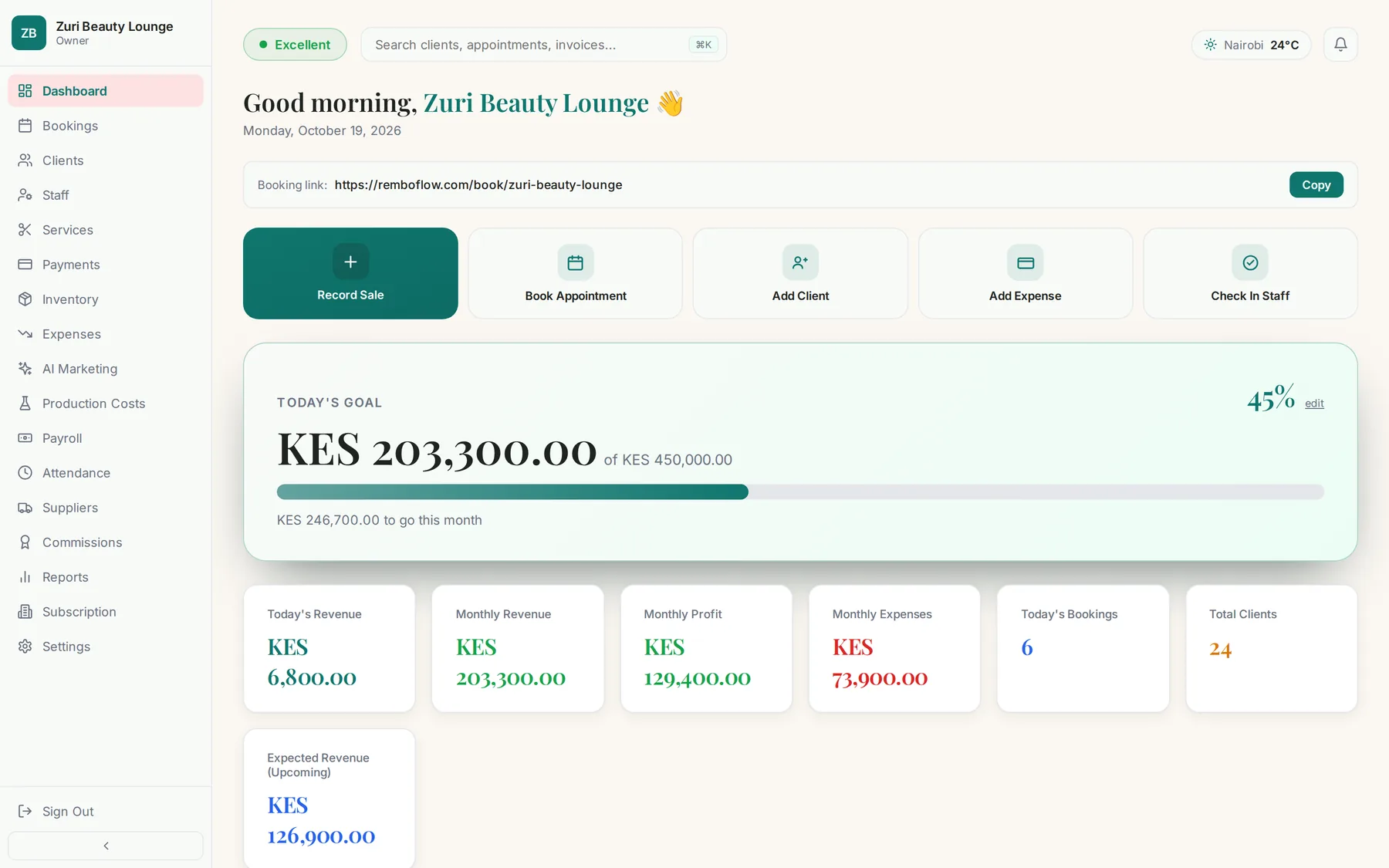 (opens the full-size screenshot in a new tab)
- On a phone or a computerClients book from their phone. You run the salon from the front desk or the office.
- Your team, their own accessStaff sign in for themselves and see the parts of the system you allow.
- Built for salons worldwideChoose your country when you sign up and RemboFlow sets your currency, phone and address formats to match.
Sound familiar?
Most salons start with WhatsApp chats, notebooks and memory
It works until the day gets busy. These are the six places where the chaos usually shows up, and what RemboFlow does about each.
Missed bookings
Clients message through different channels, and appointments slip between them.
With RemboFlowClients book through one public booking page, and every appointment lands in the same daily schedule.
Double bookings
Several staff, several services and different appointment lengths make the day hard to juggle.
With RemboFlowScheduling takes service length and staff availability into account, which helps prevent clashes before they happen.
Payment confusion
Deposits, balances and payment messages are hard to match up with the right client.
With RemboFlowEach booking keeps its deposit, payments and balance together, with a payment history you can check.
Commission arguments
Manual calculations leave staff and owners unsure who is owed what.
With RemboFlowCommission is recorded per staff member, line by line, so both sides can see how a total was reached.
Stock surprises
Products run out in the middle of a client's appointment.
With RemboFlowSet a reorder level for each product and low-stock alerts flag what needs restocking.
No clear picture
It is hard to say what happened today, or whether the month is going well.
With RemboFlowReports show what came in, what went out and what was left, for a day, a week, a month or your own date range.
One connected system
Everything connects, from first booking to month-end
You record payments against bookings, commission is calculated from those payments, and your reports draw on all of it. Here is how the pieces fit together.
Booking and scheduling
Clients book online. You see one clear schedule.
Give clients a public booking page for your salon. They choose services, staff, a date and a time, and the booking lands in the same daily schedule your team works from.
- Several services in one visit, each with its own staff member
- Scheduling that respects service length and staff availability
- Clients can find their booking to change or cancel it
- One booking link you can share anywhere
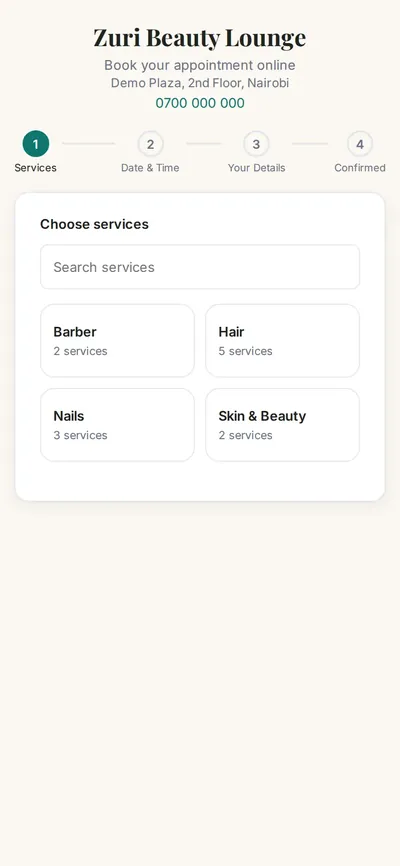
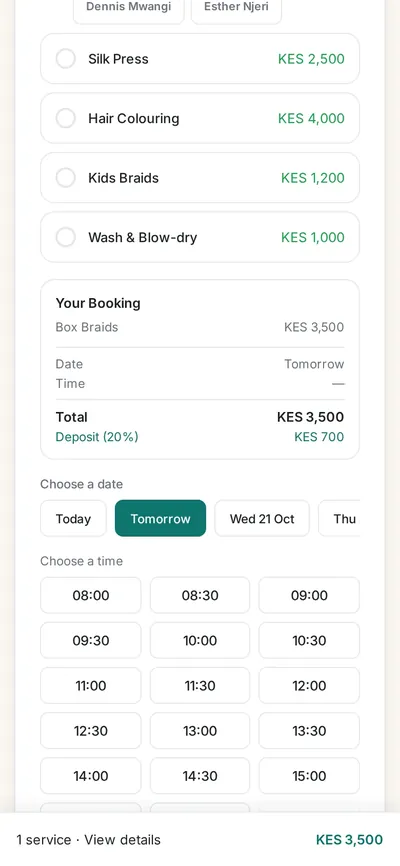
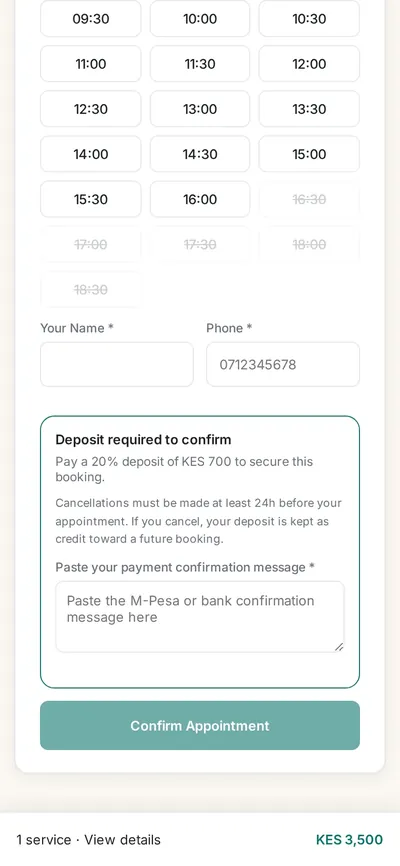
 (opens the full-size screenshot in a new tab)
Payments and deposits
Every booking keeps its money in one place
Track deposits, balances and payments without losing the link between a booking and the money received. Clients pay your salon directly, using the payment details you set up.
- Payment history and balance on every booking
- Record cash, card, bank transfer and local mobile-money payments
- Where mobile money is used, verify deposits from the pasted payment message
- SMS and WhatsApp buttons for confirmations and receipts
 (opens the full-size screenshot in a new tab)
- Booking madeA client books online, or you add the appointment yourself.
- DepositIf you set payment details, clients are asked for a deposit. You verify it.
- BalanceRecord what is paid on the day. The remaining balance stays visible.
- ReceiptSend a receipt by SMS or WhatsApp. The payment stays on the booking's history.
Staff and commissions
Commission without the arguments
See what each staff member has earned without calculators or spreadsheets. Every commission is recorded against the payment it came from, with the rate shown on each line.
- Totals per staff member for the month, with line-by-line detail
- Filter by month or by person
- Mark a staff member's day as paid
- Staff can sign in for themselves, with the access you give them
 (opens the full-size screenshot in a new tab)
Clients and inventory
Clients
Clients who feel remembered
Keep contact details, visit history, lifetime spend and loyalty points together, right next to their bookings and payments. Whoever is at the front desk can pick up where the last visit left off.
- Contact details
- Visit history
- Lifetime spend
- Loyalty points
Inventory
Stock you can see coming
Track products with quantities and a reorder level for each. Low-stock alerts point out what needs restocking before you run out.
 (opens the full-size screenshot in a new tab)
 (opens the full-size screenshot in a new tab)
Reports and production costs
Know where the money goes
See what came in, what went out in commission and expenses, and what is left, for today, this week, this month or a custom range.
- Sales, profit and loss, and client reports
- Revenue broken down by payment method
- Commission by staff member
- Export reports to PDF
Production costs
Production-cost tracking records what it costs to deliver your services: consumables used per service, plus shared costs such as rent, electricity and water.
Getting started
Start in four steps
RemboFlow is made to be set up by the salon owner, without technical help. Most of the work is adding your own team, services and details.
Create your salon account
Choose your country, then sign up with your salon name, email, phone number and a password. If asked, confirm your email.
Add your staff and services
Add your team (yourself, if you work alone), then the services you offer and their prices.
Set your details and payment instructions
Check your working hours and add your payment details. Your currency and formats are set from the country you chose.
Share your booking page
Copy your booking link from the dashboard, share it with clients and start accepting appointments.
Try it with your real salon
The free trial is meant for real use. Set up your salon, add your team and take real bookings before you decide.
Clear trial terms
The trial lasts 30 days. When it ends, you choose a plan inside the app, where the plans are shown.
Your team, their own access
Staff sign in for themselves and see only the parts of RemboFlow you allow.
Payments you can trace
Payments recorded against a booking keep their method, amount and the remaining balance on record.
Clients manage their own bookings
Clients can look up a booking to change or cancel it, subject to your salon's rules.
Questions
Frequently asked questions
What is salon management software?
It brings the everyday running of a salon into one system: bookings, clients, staff, payments, commissions, inventory and reports. Instead of piecing things together from notebooks, spreadsheets and chat messages, the whole team works from the same records.
Does RemboFlow offer a free trial?
Yes. You get a 30-day free trial to set up your salon, add your team and take real bookings. When the trial ends, you choose a plan inside the app.
Can clients book salon appointments online?
Yes. Your salon gets a public booking page where clients choose services, staff, a date and an available time. Clients can later look up their booking to change or cancel it, subject to your salon's booking and cancellation rules.
Can RemboFlow manage salon staff?
Yes. Add your team, connect them to services and bookings, and give staff their own sign-in with access to the parts of the system you allow. Each person's bookings and commission records stay linked to them.
Can RemboFlow track salon commissions?
Yes. Set a commission rate per service or service category. Commission is calculated automatically when you record a payment for a staff member's service, and it is recorded against that staff member, so you can review what each person has earned without calculating it by hand.
Can I manage salon payments and deposits?
Yes. Each booking keeps its payments, balance and payment history together. You record cash, card, bank transfer or local mobile-money payments against it, and the payment options you see depend on the country you chose. Clients pay your salon directly.
Can I track salon inventory and stock?
Yes. Record your products with quantities and a reorder level for each. Items that fall below their reorder level appear as low-stock alerts, so you can restock before you run out.
Can RemboFlow track production costs?
Yes. Production-cost tracking records what it costs to deliver your services, including consumables used per service and shared costs such as rent, electricity and water.
Which countries can I sign up from?
When you start your free trial you choose your country, currently Kenya or the United Kingdom, and RemboFlow sets up your currency, timezone, phone and address formats to match. Your country is the one you pick; it is never guessed from your location.
Run your salon without the chaos
Bookings, payments, staff, clients and stock, finally in one place. Start your free trial and see how it fits your salon.
Start your 30-day free trial30-day free trial. After that, choose a plan inside the app.